Multi-Stop Route Planner
- 4.6
- Rating
- 1.00M
- Installs
- Free
- Price
 Analysis by App-foxy
When I plan several stops in one outing, the difficult part is rarely finding an address. The real problem is deciding the order that keeps the journey sensible. Multi-Stop Route Planner is built around that exact task: arranging multiple destinations so I can spend less time zigzagging between them. I see it as a practical Maps & Navigation app for delivery work, errands, appointments, and any day when a normal map app feels too focused on one destination at a time.
My first impression is that it has a clear purpose rather than trying to become an all-in-one travel platform. The developer, MapoScope - Delivery Route Optimization Experts, presents it as a multi-stop planner, and that focus matters. I would not install it simply to replace everyday turn-by-turn navigation. I would use it before driving, when I need to think through the whole sequence and not just ask for directions to the next address.
The app is free to install and is suitable for Everyone. It has been available since November 21, 2013, which gives it a longer history than many small route-planning tools. Its current version is 25.12.08.01 and it works on Android 6.0 or later. Those details make it approachable for people using older phones, although the actual experience will still depend on the device, map services, and the quality of the addresses I enter.
You May Also Like

 Blood Strike: 2.5 Anniversary
Blood Strike’s Loadouts Turn Every Drop Into a Tactical Gamble
A close look at Blood Strike’s custom loadouts: how fast access to signature weapons reshapes its battle royale rhythm, rewards preparation, and narrows the gap between fights.

 Pandora - Music & Podcasts
Pandora’s Music Is Easy to Start, but Harder to Recover
Pandora’s strength is its low-effort path from a seed to a station. Its weak spot is how much confidence it asks you to place in connection, setup, and quiet recovery.

 8 Ball Pool
 Is Built on Rivalries, Rematches, and Routine
A close look at the rivalries, rematches, shared routines, and unanswered safety questions that turn a quick pool match into a persistent mobile community.

 Samsung Music
’s Quiet Strength Is Playing What You Already Own
Its reach comes less from spectacle than from dependable access to a personal library. That simplicity is both the app’s strongest retention engine and its ceiling.

 AccuWeather: Weather Radar
AccuWeather Review: A Quick, Clear Forecast for Everyday Decisions
For everyday plans, the best forecast is the one you can understand quickly. AccuWeather makes rain timing, radar, and local conditions easy to act on, with a few trade-offs.

 Hill Climb Racing
Why Hill Climb Racing Still Turns Crashes Into One More Run
A tiny car, a bumpy hill and one more upgrade: Hill Climb Racing keeps resurfacing because its simple chaos makes every near-miss feel personal.
More From Our News Desk



What the planner is really useful for
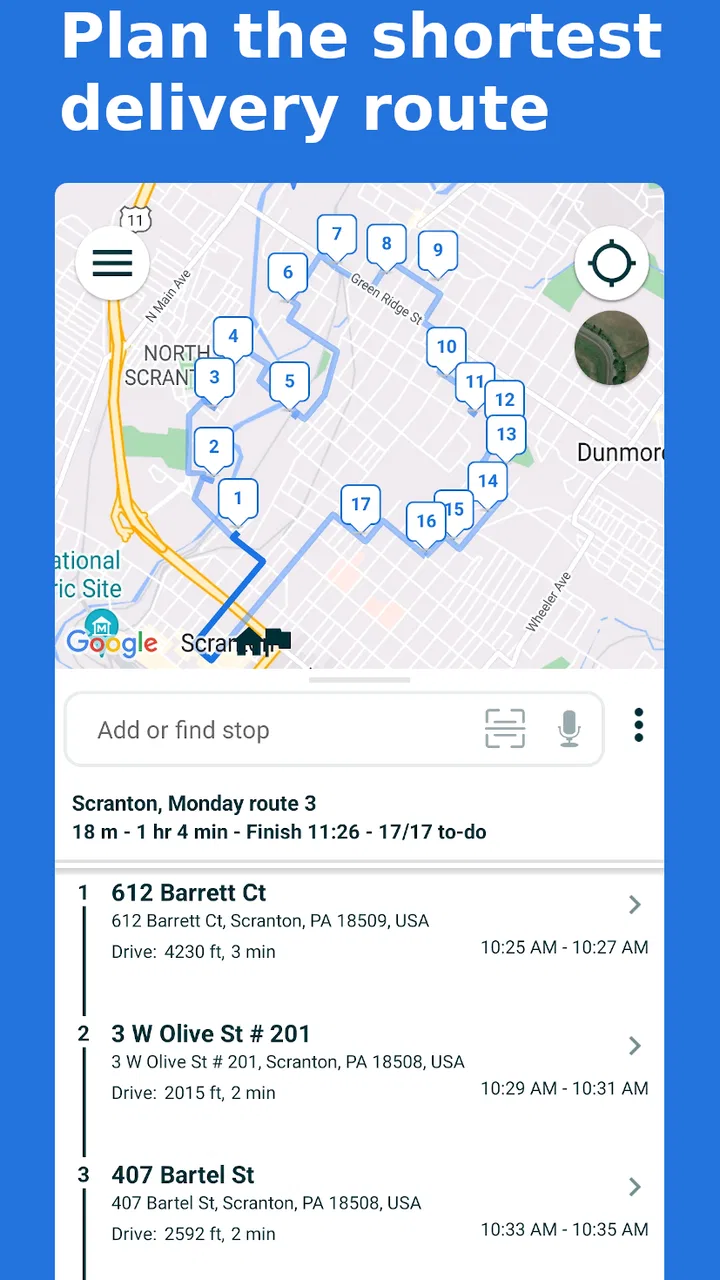
The strongest use case is a route with several destinations that do not already have an obvious order. Imagine I have a morning of deliveries across different neighborhoods. Entering each address into a regular navigation app one at a time tells me how to reach each place, but it does not necessarily help me decide which stop should come first. A multi-stop planner gives me a place to organize the route before I begin driving.
I also find the idea useful for ordinary errands. If I need to visit a pharmacy, a hardware shop, a parcel counter, and a supermarket, the best order may depend on distance and the shape of the trip. Planning the stops together can prevent the familiar mistake of passing near one location, continuing elsewhere, and then driving back later. That is where the app’s promise of saving time becomes practical rather than just promotional.
There is a useful distinction between route planning and navigation. This app belongs mainly to the first category. I would use it to prepare the sequence, review the overall path, and make a deliberate decision before setting off. For detailed live guidance, traffic awareness, lane instructions, or walking directions inside a large complex, I would still expect to rely on a conventional navigation service when needed.
That combination is not a weakness by itself. In fact, it can be a better workflow. I can use this planner for the strategic part of the journey and keep my familiar navigation tool for the final driving instructions. The trade-off is that I may need to move between apps or services instead of expecting one application to handle every stage equally well.
How I would use it before leaving
I would begin by collecting the destinations in a simple list, preferably with complete street details and consistent formatting. This is more important than it sounds. Route optimization cannot rescue a vague address, a missing unit number, or a business listing that points to the wrong entrance. Before accepting the suggested order, I would quickly scan every stop and check that the route matches the real purpose of the trip.
For a delivery round, I would group the addresses by area before entering them. That gives me a useful mental comparison with the app’s proposed sequence. If the result sends me across town and back, I would not blindly follow it. I would investigate whether one address was entered incorrectly, whether a stop has a time constraint, or whether the shortest distance conflicts with the order in which parcels are loaded.
That last point is one of the less obvious trade-offs. A mathematically efficient route is not always the most efficient working route. If the package for the final stop is buried under several others, unloading at the “best” first stop may waste time. I would use the planner to create a strong starting plan, then adjust it around practical details such as opening hours, parking, loading, and customer availability.
For a personal day out, I would do something similar but with fewer formal constraints. I might plan several stores and a café, then decide whether the app’s order feels natural. If the route crosses a busy road repeatedly, I may prefer a slightly longer sequence that is easier to drive. The app helps me see the structure of the journey; it does not remove the need for common sense.
Where it stands beside ordinary map apps
Most familiar map applications are excellent when I know where I am going next. They usually make it easy to search for a place, start navigation, and receive guidance. Their weakness appears when I have a long list of destinations and need to optimize the complete order rather than simply add stops manually.
Multi-Stop Route Planner is more specialized. Its value is not that it replaces every map feature, but that it treats a collection of destinations as a planning problem. For a courier, real-estate agent, service worker, or busy household, that focus can be more useful than a general map interface with a basic stop list.
On the other hand, someone who only makes occasional two-stop trips may find a normal map app quicker. If I am driving to a restaurant and then home, there is little benefit in opening a dedicated planner. The extra planning step earns its place when the number of destinations, the distance between them, or the cost of backtracking becomes meaningful.
I would also be cautious about comparing it with specialist fleet software. A professional operation may need dispatching, driver communication, delivery proof, vehicle restrictions, reporting, or team administration. This app’s visible identity is centered on planning multi-stop routes, so I would not assume it provides the broader management system that a company might require.
Trust, controls, and moments that deserve attention
Because this app deals with addresses, trust is not just about whether the route looks efficient. I would pay attention to the choices presented during setup and use: what access the app requests, whether location access can be limited, how destinations are added or removed, and whether I can review the route before beginning. These are the controls that affect how comfortable I feel using it for work or personal errands.
I would avoid entering more information than the route requires. For a delivery, that may mean using the necessary address without adding private notes that could identify a customer unnecessarily. For a personal trip, I would think twice before storing sensitive destinations if I only need a one-time route. A planner is most useful when I treat every address as information that deserves care, not as disposable text.
Location access is another data-sensitive moment. If I only want to prepare a route at home, I would prefer to enter destinations without sharing my live position unless the app clearly needs it for the task I am performing. When I am actually traveling, location can make navigation more convenient, but I would still look for the operating system’s permission choices and select the narrowest option that supports my intended use.
I also recommend checking the app’s visible settings before relying on it for a full workday. I would look for ways to clear old destinations, edit a mistaken address, and remove a stop without rebuilding the entire plan. Those small controls influence user agency more than a polished map view does. If I cannot easily correct an error, the route becomes harder to trust.
The app has an average rating of 4.6 from around 16 thousand ratings, with roughly 1.1 thousand written reviews, and it has passed the million-install mark. Those figures suggest that many people find the concept useful, but they do not replace my own checks. A high rating cannot tell me whether the interface suits my workflow, whether my local addresses are recognized accurately, or whether the available controls match my privacy expectations.
Practical limitations I would plan around
The biggest limitation is that route optimization is only as reliable as the inputs and assumptions behind it. A planner may choose an efficient order on a map while overlooking a delivery window, a difficult parking area, a private road, or a building whose entrance is far from its listed address. I would treat the result as a recommendation, not an instruction that overrides local knowledge.
There is also a human-cost issue. Entering many destinations takes preparation, and that preparation may feel excessive for a short trip. If I am already late and have only a few stops, manually using my usual map app could be faster. The dedicated planner pays off when planning time prevents a larger amount of driving or confusion later.
Address quality can create friction too. Businesses sometimes have several entrances, apartment buildings can contain multiple units, and map pins may sit on a nearby road rather than at the usable entrance. For deliveries, I would add a quick verification step before departure and keep important access notes somewhere appropriate rather than assuming the optimized route understands them.
Another trade-off concerns changing plans during the day. A new stop, a canceled appointment, or a customer who is unavailable can make the original sequence obsolete. I would not expect a preplanned route to remain perfect after several changes. The sensible approach is to pause safely, revise the route, and check the new order instead of making edits while driving.
The app is free, but in-app purchases range from $4.99 to $99.95 per item. That makes it especially important to review any upgrade screen carefully before confirming a purchase. A casual user may be satisfied with the free starting point, while a frequent driver may consider paid options worthwhile if they remove a recurring limitation. I would decide based on how often I plan multi-stop journeys, not simply on the presence of extra features.
Who will get the most from it
I think the best audience is anyone who regularly handles several destinations in one outing. Delivery drivers can use it to organize a round before leaving. Salespeople and field technicians can use it to reduce unnecessary crossings between appointments. Families can use it for a day of errands, especially when the stops span different parts of town.
It may also help people who are visiting an unfamiliar area but want to make a deliberate plan rather than improvise at every turn. A traveler with several sights, shops, or collection points can prepare the sequence in advance and then use a familiar navigation tool for the actual movement between stops.
I would be more hesitant to recommend it to someone who wants only live traffic guidance or a seamless public-transit experience. Those needs belong more naturally to a full navigation or transit app. I would also suggest caution for businesses that need shared routes, centralized dispatch, or detailed operational records. A multi-stop planner can support a workflow without necessarily being the complete workflow.
For privacy-conscious users, the right question is not simply whether the app is useful. It is whether the available permission and destination controls feel clear enough for the way they intend to use it. I would start with a low-sensitivity test route, review the settings, and only then decide whether it belongs in a work routine involving customer addresses.
A realistic day with the app
Suppose I have six deliveries in the same broad region, but the addresses form an awkward loop. I would enter them before loading the vehicle, check that each destination is correct, and compare the proposed order with my package layout. If the planner places a distant stop first but that parcel is buried, I may swap the first two destinations. That small adjustment could save more time than following the shortest theoretical route.
Before departing, I would note which stops have special access concerns and confirm that the route does not depend on a road I know to be unsuitable for the vehicle. During the round, I would follow the sequence only while it remains practical. If a recipient changes the appointment, I would stop in a safe place, remove or reorder the affected destination, and review the revised plan.
At the end, I would clear old addresses if the app provides a straightforward way to do so, particularly when the destinations belong to other people. This is a simple habit, but it gives me more control over what remains on the phone. I would also avoid treating the route history as a permanent record unless I specifically need it for my own work process.
My cautious verdict
Multi-Stop Route Planner earns its place when the problem is not finding one destination but making several destinations fit together. I like its focused purpose, its long availability, and the fact that it can complement rather than compete with the navigation app I already know. For repeated delivery rounds or complicated errand days, planning the order first can make the whole outing calmer and less wasteful.
My recommendation comes with conditions. I would verify every address, review the suggested order, consider real-world constraints, and check permission and data controls before using it with sensitive destinations. I would also remember that optimization is a starting point, not a guarantee of the fastest or easiest drive in every situation.
With a 4.6 average and more than a million installs, it is clearly an established option in its niche. Still, I would choose it for the specific job of arranging multiple stops, not as a universal replacement for maps, traffic information, or business fleet software. If your regular travel problem is backtracking between several places, this is a sensible tool to try; if your trips are simple, its extra planning step may not be worth it.
The free entry point makes testing straightforward, while the optional purchases mean I would inspect the choices carefully before paying. Overall, I see it as a practical planner for people who want more control over the shape of a journey. Used thoughtfully—with accurate addresses, a final human check, and sensible privacy habits—it can turn a messy list of stops into a route I can actually work with.
FAQs for Multi-Stop Route Planner
01What is Multi-Stop Route Planner and how does it work?
Multi-Stop Route Planner is a navigation app designed to optimize routes with multiple stops. It calculates the most efficient path, saving both time and fuel. Users simply input their destinations, and the app provides a streamlined route, considering traffic conditions and distances to ensure the quickest journey possible.
02Is Multi-Stop Route Planner available for both Android and iOS devices?
Yes, Multi-Stop Route Planner is available for download on both Android and iOS platforms. Users can find the app on the Google Play Store for Android devices and the Apple App Store for iOS devices, ensuring accessibility regardless of your smartphone preference.
03Does the app require an internet connection to function?
While Multi-Stop Route Planner performs best with an internet connection to access real-time traffic updates, it also offers offline functionality. Users can download maps for offline use, allowing them to navigate routes without active internet access, though real-time traffic data will be unavailable offline.
04Are there any costs associated with using Multi-Stop Route Planner?
Multi-Stop Route Planner offers a free version with basic features. For more advanced capabilities, such as unlimited stops and enhanced traffic data, a premium subscription is available. Users can choose between monthly or annual plans, providing flexibility depending on usage needs.
05How accurate is the route optimization in Multi-Stop Route Planner?
The app uses advanced algorithms to ensure high accuracy in route optimization. It factors in current traffic conditions, distances, and historical data to provide the most efficient routes. Users generally find the app reliable, though occasional discrepancies can occur, as with any navigation service.
Pros
- Optimizes delivery routes efficiently.
- User-friendly interface with clear maps.
- Supports multiple destinations seamlessly.
- Real-time traffic updates included.
- Customizable route preferences available.
Cons
- Limited offline functionality.
- Occasional app crashes reported.
- Subscription required for premium features.
- No integration with some GPS devices.
- Lacks voice navigation support.

Multi-Stop Route Planner
Gallery